Can you multistream on Twitch? The 2026 rules for Twitch, YouTube, Kick and TikTok
Yes, you can multistream on Twitch — with rules. Here is what Twitch, YouTube, Kick and TikTok allow in 2026, including what you can and cannot do with combined chat.
6 min read
For years, the answer to "can I stream to Twitch and YouTube at the same time?" was no, at least for Twitch Affiliates and Partners. That changed in October 2023, when Twitch opened up simulcasting. Today, most streamers can broadcast to Twitch, YouTube, Kick and TikTok at once.
Most, with rules. Each platform has its own conditions, one of them costs money, and the rules on combined chat catch out a lot of multistreamers.
This guide covers what each platform allows as of October 2026, and how to handle chat when you are live in several places at once.
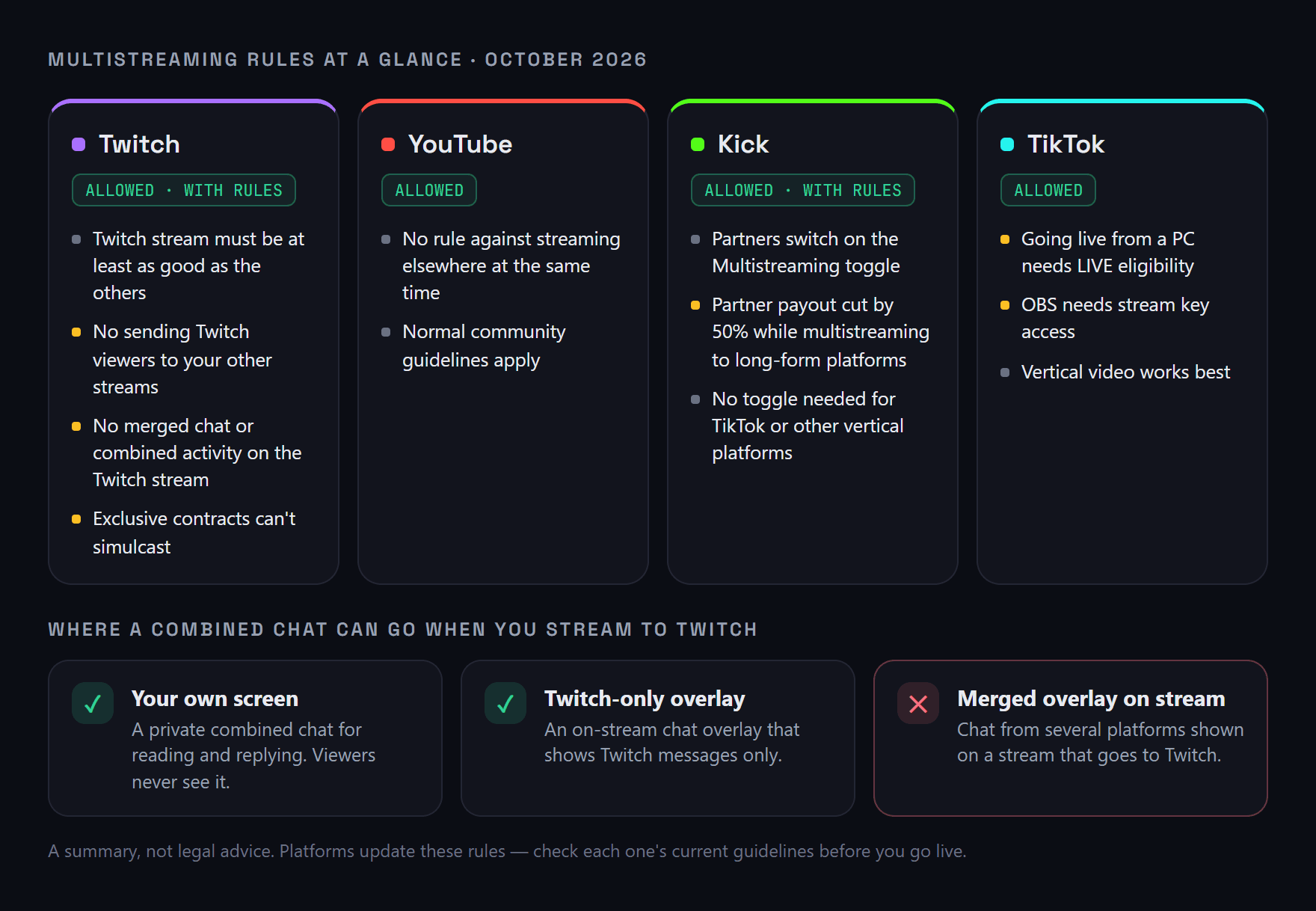
A summary of each platform's rules as of October 2026. Platforms update these — always check the current guidelines.
The short answer
- Twitch: yes, unless you have an exclusive contract — but your Twitch stream must be at least as good as the others, and you cannot show merged chat on it.
- YouTube: yes, with no rules about streaming elsewhere at the same time.
- Kick: yes, but Kick Partners must switch on a Multistreaming toggle and receive half their partner payout while multistreaming to other long-form platforms.
- TikTok: yes, if your account can go LIVE from a computer.
Twitch's simulcasting rules
Twitch allows Affiliates and Partners to stream to other platforms at the same time, as long as they follow its simulcasting guidelines. The main rules:
Your Twitch stream must be at least as good
The experience on Twitch has to be equal to or better than everywhere else. In practice, do not send Twitch a lower resolution, bitrate or frame rate than your other destinations, and do not neglect Twitch chat in favour of another platform's.
Do not send Twitch viewers elsewhere
While you are simulcasting, you cannot direct Twitch viewers to watch your concurrent stream on another platform — no "come watch on YouTube" and no links to your other live streams in Twitch chat or on your Twitch stream.
No merged chat on your Twitch stream
This is the rule most multistreamers trip over. Twitch's guidelines say you must not show combined activity from other platforms on your Twitch stream, and that includes merged chat. A chat overlay that mixes Twitch, YouTube and Kick messages is not allowed on a broadcast that goes to Twitch.
You can use a combined chat privately, for reading and replying yourself. The restriction is about what appears on the stream, not what you look at.
Exclusive contracts
Streamers with an exclusivity agreement with Twitch cannot simulcast. If you signed a contract with Twitch, it overrides the general rules.
YouTube
YouTube does not restrict streaming the same content elsewhere at the same time. Your stream still has to follow YouTube's community guidelines and monetisation policies, as any stream would.
Kick
Kick allows multistreaming, but for Kick Partners it comes at a price:
- If you stream to another long-form platform such as Twitch or YouTube at the same time, you need to switch on the Multistreaming toggle, found under Partner Income in your Kick dashboard. You can also use the
/multi onand/multi offchat commands. - While multistreaming with the toggle on, your partner payout is reduced by 50% for that session.
- Vertical and short-form platforms, such as TikTok LIVE, YouTube Shorts and Instagram Live, do not require the toggle.
If you are not a Kick Partner, the payout rule does not affect you.
TikTok
TikTok allows you to stream elsewhere at the same time. The practical limit is access: to go live from a computer, your account needs to be eligible for LIVE, and streaming from OBS or a multistreaming service needs a TikTok stream key, which not every account has. TikTok is also vertical-first, so a 16:9 gaming stream needs its own layout to look good there.
If you are adding TikTok to a PC setup, how to see TikTok Live chat on PC and in OBS covers the chat side.
How to handle chat when you multistream
Sending video to four platforms is the easy part — a multistreaming service or an encoder with multiple outputs does it for you. Chat is where multistreaming gets hard. You now have up to four audiences, each in a separate chat, who cannot see each other.
A setup that keeps you within the rules:
- Read every chat in one private feed. A multichat tool like StreamBuddy merges Twitch, YouTube, Kick, TikTok and Rumble chat into one window for you, with a platform icon on every message. This is allowed under Twitch's rules, because it never appears on your stream.
- If you show chat on stream, show Twitch chat only. StreamBuddy's OBS overlay lets you choose which platforms appear. When your broadcast goes to Twitch, set the overlay to Twitch only — or leave chat off the stream entirely.
- Answer everyone, not just Twitch. Equal treatment is the spirit of Twitch's rules and good manners anyway. A combined feed makes it much easier to notice a YouTube question you would otherwise miss.
- Keep platform-switching talk off Twitch. Do not tell Twitch viewers to go to your other streams while you are live there.
If you are new to reading several chats at once, how to combine your streaming chats into one feed explains the basics, and reading Twitch and YouTube chat at the same time covers the most common pairing.
Frequently asked questions
Is multistreaming allowed on Twitch?
Yes. Since October 2023, Twitch Affiliates and Partners can stream to other platforms at the same time, as long as they follow Twitch's simulcasting guidelines. Streamers with an exclusive Twitch contract cannot.
Can I show a combined chat on my Twitch stream?
Not under Twitch's current written guidelines, which prohibit showing combined activity from other platforms — including merged chat — on your Twitch stream. You can use a combined chat privately, and you can show a Twitch-only chat overlay.
Can I multistream to Twitch and Kick at the same time?
Yes. Twitch allows it under its simulcasting rules. On Kick, Partners must switch on the Multistreaming toggle, which reduces their partner payout by 50% while they are multistreaming.
Does multistreaming to TikTok affect my Kick payout?
According to Kick, vertical and short-form livestreaming platforms such as TikTok LIVE do not require the Multistreaming toggle, so streaming to TikTok alongside Kick does not trigger the payout reduction.
Do I need a special tool to read chat from every platform?
You need either several windows open at once or a multichat tool that merges them. StreamBuddy combines Twitch, YouTube, Kick, TikTok and Rumble chat into one private feed, and keeps a profile for each viewer.
Multistream without losing chat
StreamBuddy puts every platform's chat in one private feed, with an OBS overlay you can limit to Twitch — so you can answer everyone and stay within the rules.
Try StreamBuddy- multistreaming
- simulcasting
- twitch rules
- kick
- youtube
- tiktok
- multichat