Chat moving too fast to read? How Big Streamer Mode keeps up
Chat moving too fast to read? Big Streamer Mode turns a flood of Twitch, YouTube and Kick messages into live vote tallies, repeated asks, questions and support.
10 min read
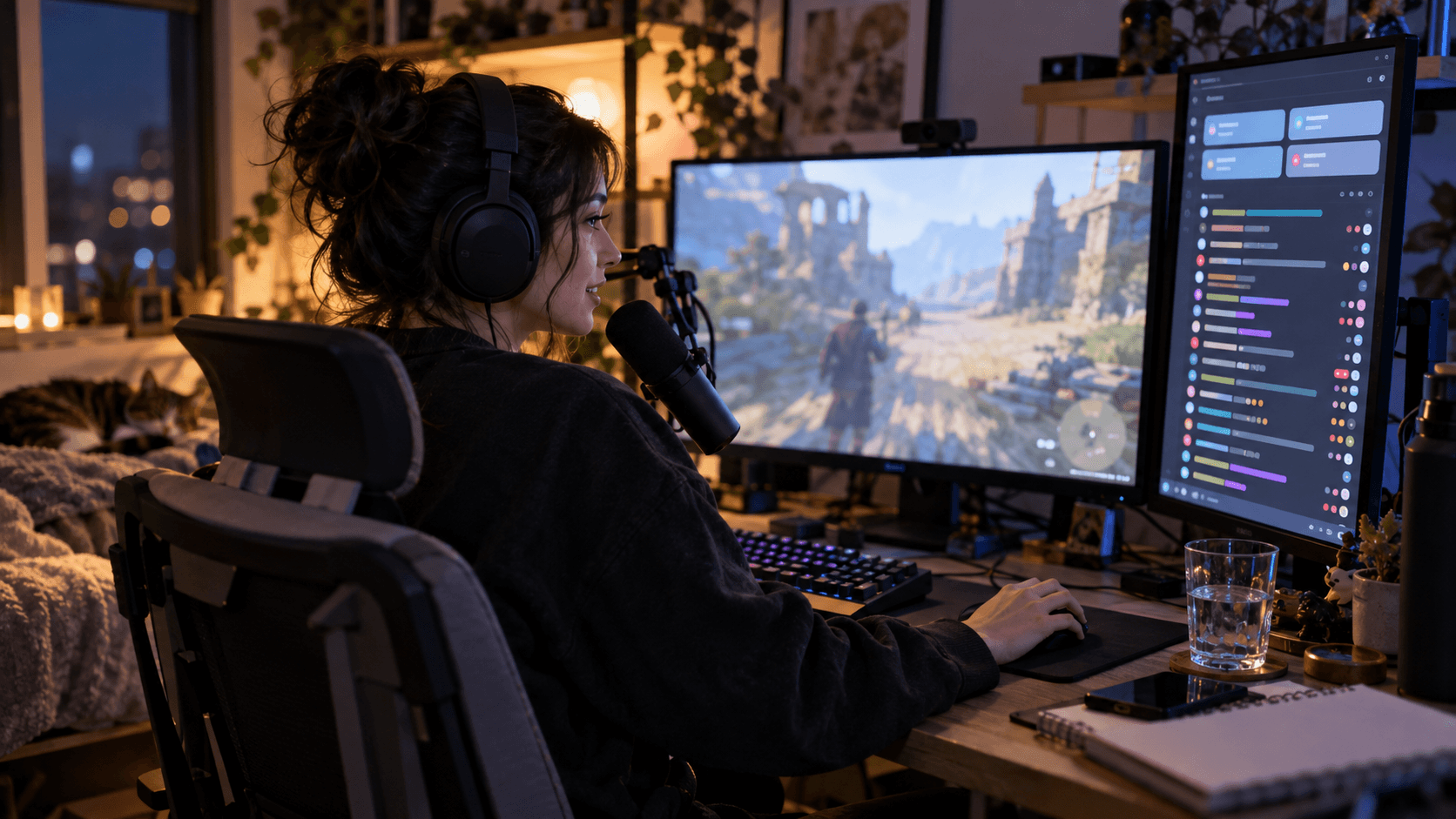
Every growing channel hits the same wall. Somewhere around three messages a second, chat stops being a conversation you read and becomes a waterfall you glance at. You catch a username, half a sentence, an emote wall — and then it is gone.
Big Streamer Mode is StreamBuddy's answer to that wall. Instead of asking you to read faster, it reads for you: it tallies the votes, notices what dozens of people keep repeating, pulls out the questions actually aimed at you, and makes sure a twenty-sub gift does not scroll past unseen.
This guide covers why fast chat is so hard to read, how streamers usually cope, and exactly what Big Streamer Mode shows you.
Why fast chat is impossible to read
The maths is unkind. A typical chat panel shows about twenty lines. At 10 messages a second, each line is on screen for roughly two seconds — less time than it takes to read it, let alone decide whether to reply. At 25 a second, a message is gone before your eyes have finished moving to the chat window.
And you are not only reading. You are playing, talking, watching your scene and managing the energy of the stream. Chat gets a glance every few seconds at best, so whatever happens to be on screen during that glance is what you respond to. That is how a streamer ends up answering one random message while forty people asked the same question in the previous minute.
The irony is that busy chat usually has fewer distinct things to say, not more. When chat is flying, it is mostly the same handful of reactions, a vote, a recurring question and some support. The signal is there; it is just smeared across hundreds of lines.
How streamers usually cope with fast chat
Big channels have long relied on a few workarounds. All of them help, and all of them cost something.
| Approach | What it fixes | What it costs |
|---|---|---|
| Slow mode | Fewer messages to read | Viewers feel muted and hype moments go flat |
| Sub-only or follower-only chat | A smaller, calmer chat | Shuts out the newer viewers you want to keep |
| Mods relaying messages | Someone filters for you | Depends on a mod being free, fast and watching |
| Platform polls | Clean vote counts | Must be set up in advance, and chat spams numbers anyway |
| Ignoring chat | Lets you focus | The audience notices |
Big Streamer Mode does not replace good mods, and slow mode still has its place on a genuinely chaotic day. It fixes the part none of these do: knowing, at a glance, what the crowd is collectively saying.
What is Big Streamer Mode?
Big Streamer Mode is a live summary panel that sits above your chat in StreamBuddy. When chat moves faster than you can read, it condenses the latest messages into a handful of cards: chat speed and mood, live vote tallies, things many viewers keep repeating, questions for you, paid support, and messages from your mods and VIPs. Your full chat feed keeps running underneath.
The panel refreshes every second and works on every platform StreamBuddy supports — Twitch, YouTube, Kick, TikTok and Rumble.
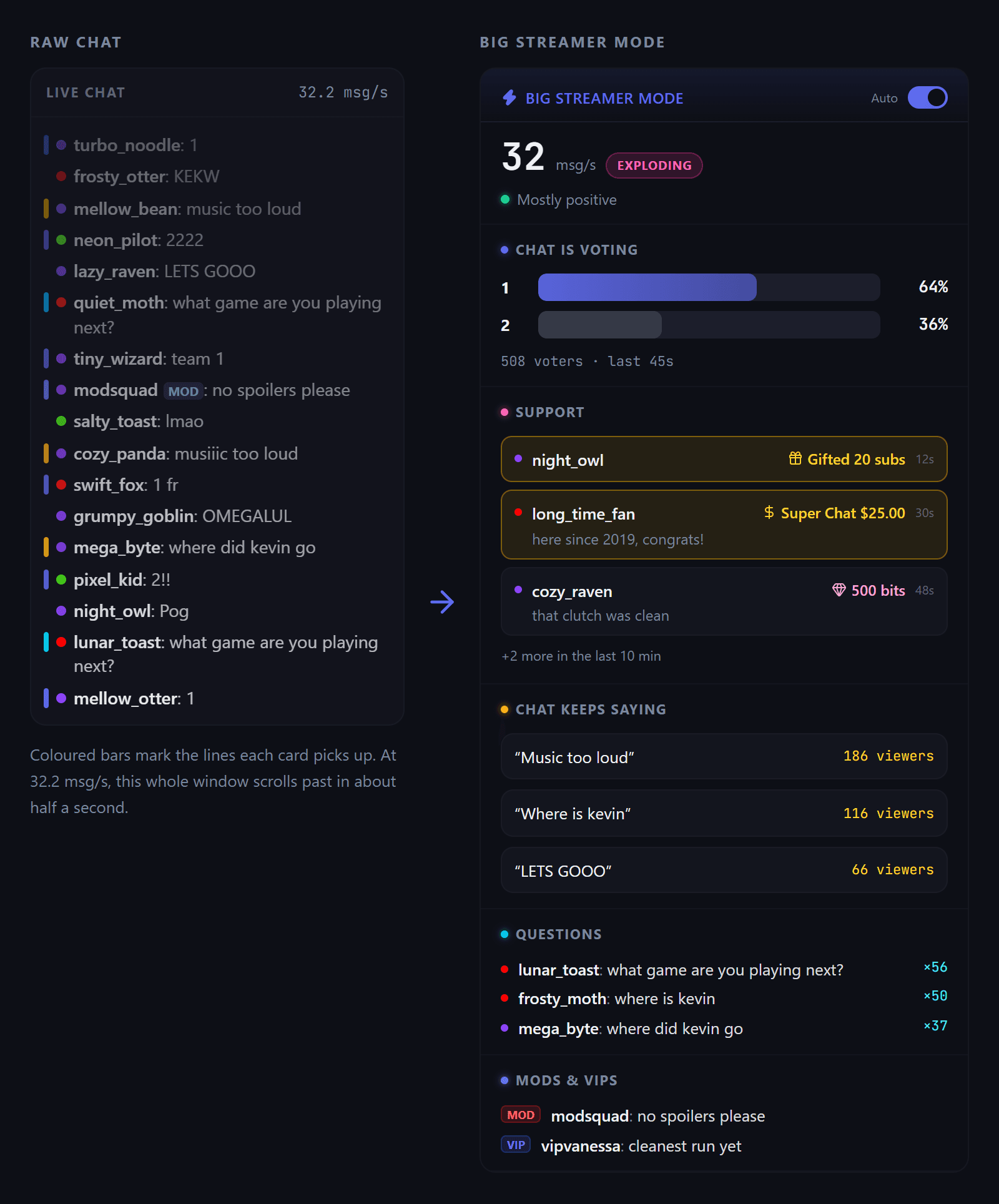
The same chat, two ways. Coloured bars on the left mark the messages each card picked up. Demo chat, run through the real Big Streamer Mode logic.
What each Big Streamer Mode card shows
Each card answers one question you would otherwise have to work out by reading. You can hide any of them or change their order, which is covered in the setup steps below.
Chat speed and mood
The top line shows messages per second, measured over the last ten seconds, with a label for the pace:
- Calm — under 3 messages a second
- Active — 3 to 10
- Very active — 10 to 25
- Exploding — 25 and up
Next to it is the mood of the room over the last 30 seconds: mostly positive, mixed, mostly neutral or turning negative. Each viewer counts once, for their latest message, so one person spamming "trash" cannot drag the reading down against a crowd typing "gg". If the mood turns mid-segment, you see it before it becomes the only thing in chat.
Chat is voting: live tallies without a poll
Ask chat "1 or 2?" and you get a wall of 1, 2222, team 1 and 2 obviously. Big Streamer Mode recognises all of those and shows a live tally with percentages and the current leader — no poll to set up beforehand.
It understands numbers (1 to 9), letters (A to D) and W/L verdicts, including repeats and short asides like "1 fr". Longer sentences are ignored, so "1 more game please" is not a vote for option one.
To stop stray messages from looking like a poll, the card only appears when:
- at least 12 different viewers vote within 45 seconds,
- votes make up a real share of what chat is saying, and
- at least two options have more than one backer.
Each viewer counts once, for their most recent vote. Switching sides is reflected; spamming is not rewarded.
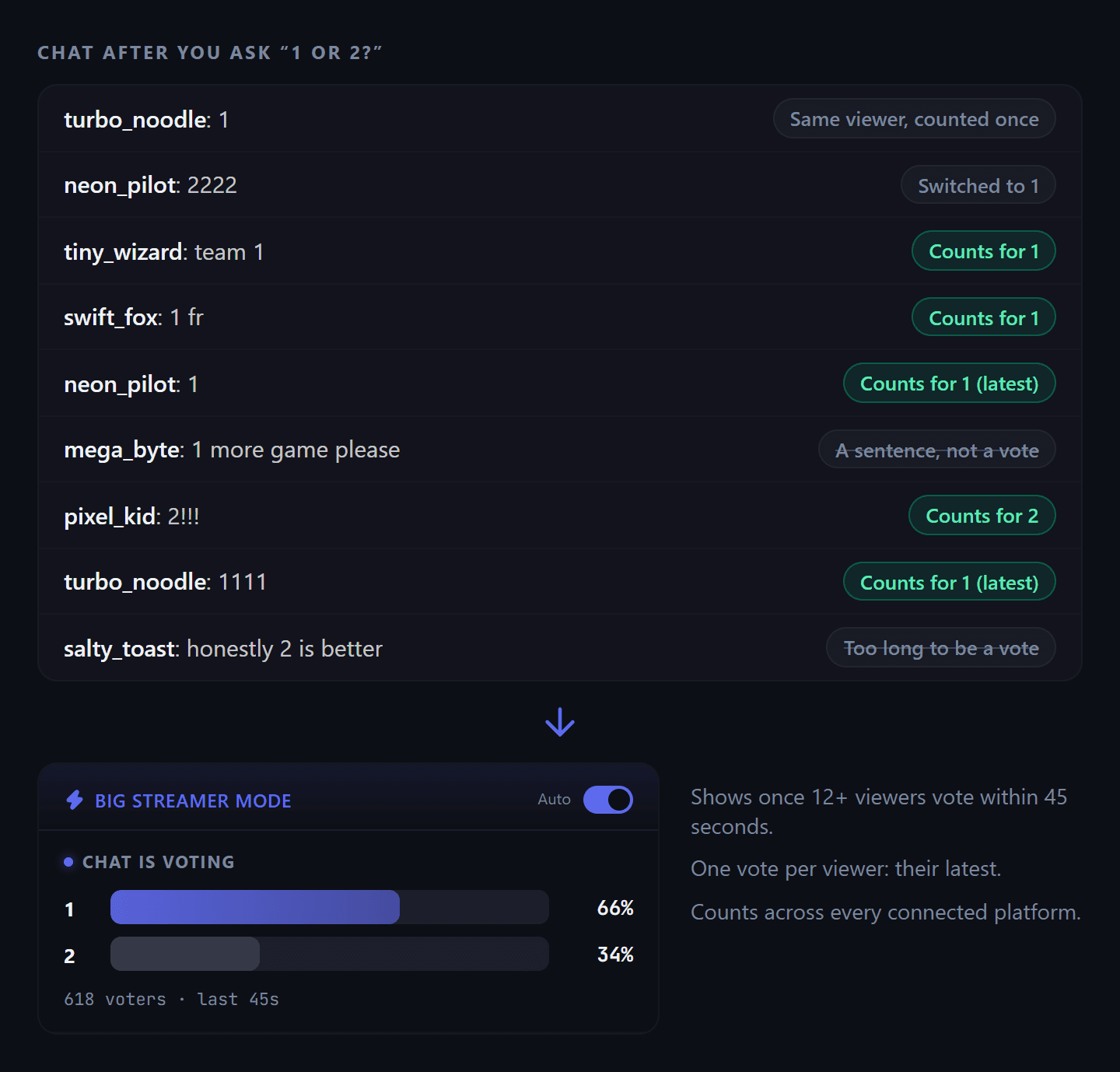
Every label on the left comes from the vote parser itself, so this is exactly how these messages are counted.
Chat keeps saying
This is the card that catches what you most need to hear: "music too loud", "your mic is muted", "where did Kevin go". It groups messages that say the same thing in slightly different words — "musiiic too loud" and "music too loud" land in the same bucket — and shows the top repeated asks from the last minute, along with how many viewers said them.
A topic needs at least five different viewers before it appears, so one persistent person cannot make something look like a trend. Expand any row to see a few of the actual messages behind it.
Questions for you
Fast chat is full of question marks that are not really questions: "?", "wut?", "huh??". This card skips those and looks for genuine questions — at least three words, with either a question mark or an opener like what, how or why.
When several people ask the same thing, their messages merge into one row with a count of how many asked, and the most-asked questions sit at the top. The card looks back two minutes, so a question asked just before you glanced over is still waiting for you.
Support
Paid support should never be the thing that scrolls past. The Support card collects it from every connected platform and keeps it on screen for ten minutes:
- Twitch: bits, subs, resubs, gifted subs, raids and charity donations
- YouTube: Super Chats, Super Stickers, memberships and gifted memberships
- Kick: subs, gifted subs and Kicks
- TikTok: gifts and subscriptions
- Rumble: Rants
Bigger moments get an accent so they stand out even in a long list: Super Chats and donations of $20 or more, 2,000+ bits, 10+ gifted subs, 2,000+ Kicks, and raids of 100+ viewers. The supporter's own words — the comment on a Super Chat or the message with a cheer — appear alongside, so you can read them out properly.
Follows, likes and joins are deliberately left out. At big-stream volume they would bury the support that actually matters.
Mods and VIPs
Your mods are often the first to flag a problem: a spoiler, a raid that is not friendly, a link that needs checking. This card shows the latest three messages from your mods and VIPs over the last two minutes, so they do not have to spam to get your attention.
Clicking a name on any card opens that viewer's StreamBuddy profile — their history, your notes and how long they have been around — so you can tell a regular from a first-timer before you respond. That viewer memory is what a streamer CRM is for, and it matters most precisely when chat is too fast to recognise anyone by eye.
When Big Streamer Mode turns on: Auto, On and Off
Big Streamer Mode has three settings:
- Auto (the default) — the panel appears by itself once chat holds 3 or more messages a second for ten seconds, and hides again after chat stays under 2 a second for a full minute. The gap is deliberate: a single spike does not pop it open, and a short lull between hype moments does not snap it shut.
- On — always shown, whatever the chat speed.
- Off — never shown, with nothing running in the background.
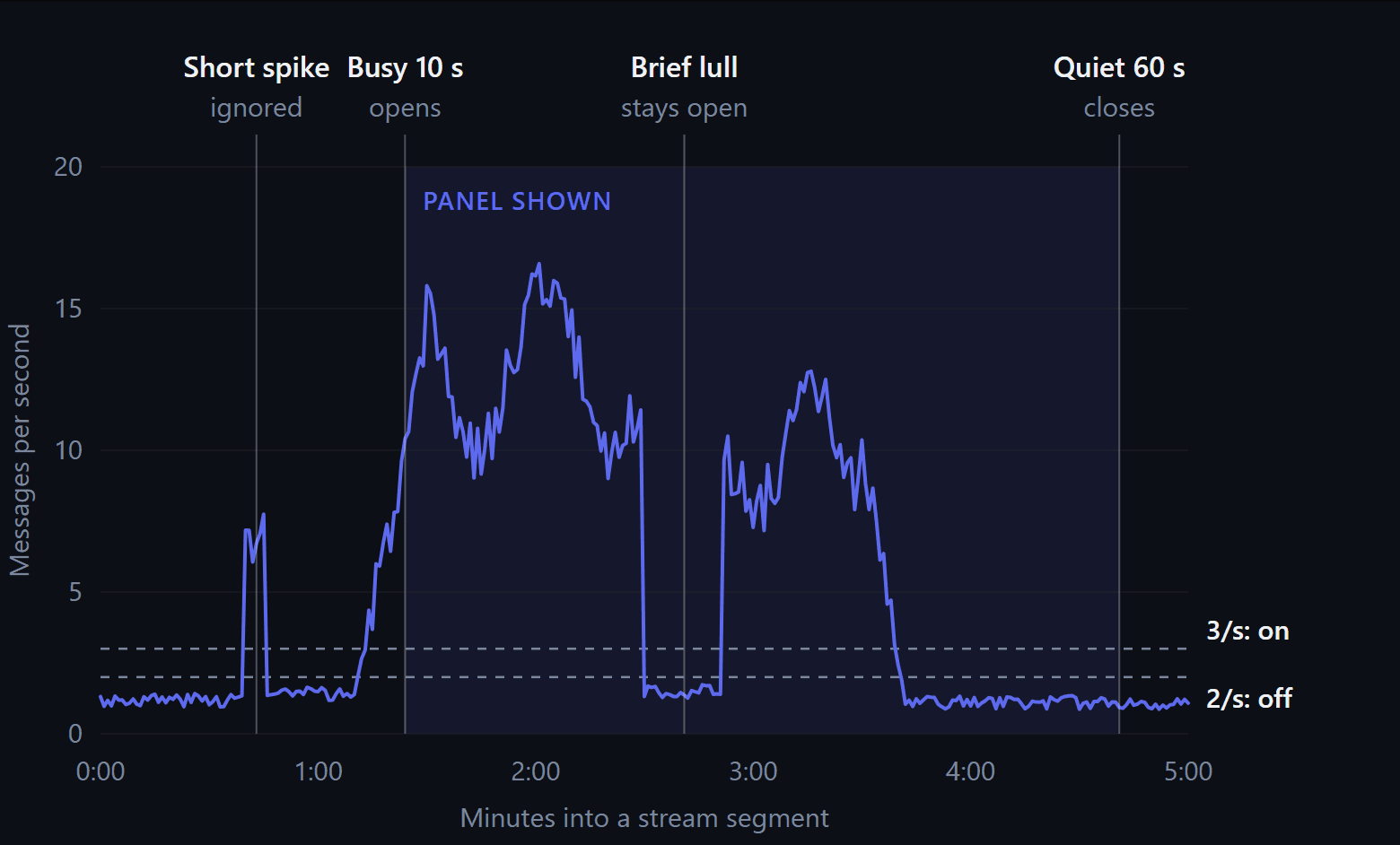
A simulated five-minute segment, with the on/off decisions made by the same Auto mode code the app runs.
The lightning-bolt button in the chat header overrides Auto for the rest of your session. The panel then shows Manual, with a reset link that hands control back to Auto.
Because Auto keeps an eye on chat while the panel is hidden, a vote or trend that was already building is visible the moment the panel opens. It never starts from empty.
How to set up Big Streamer Mode
- Open StreamBuddy and connect the channels you stream on, if you have not already.
- Open chat settings and select the Big Streamer tab.
- Choose Auto, On or Off.
- In the card list, switch on the cards you want and use the arrows to set their order. Put whatever you check most — usually votes or questions — at the top.
- Pick a layout. Stacked shows cards in a single column; Side by side uses two columns once your chat panel is wide enough (about 450 pixels).
- While live, drag the LIVE CHAT divider under the panel to give the summary more or less room. Double-click the divider to reset it.
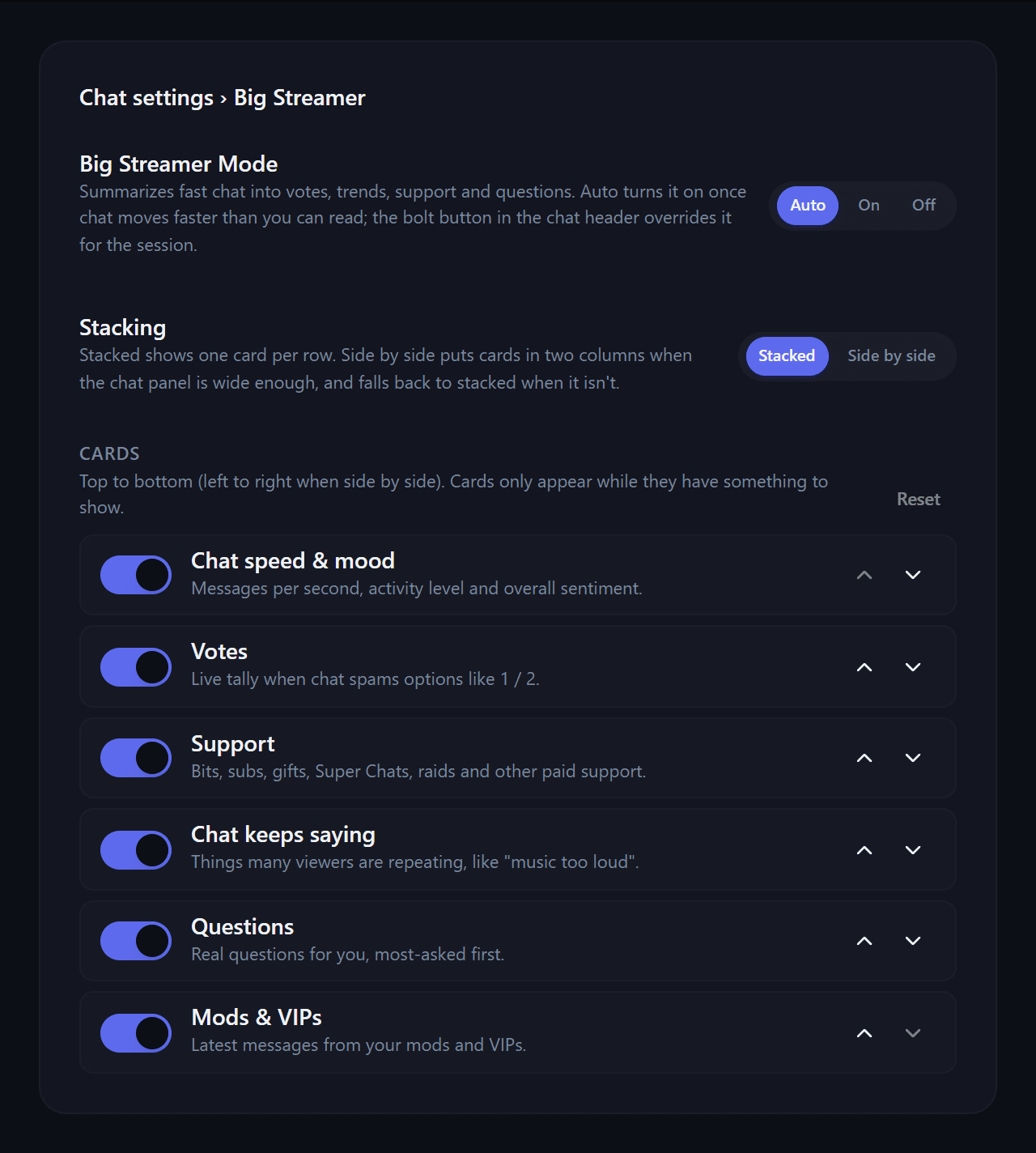
The Big Streamer tab in chat settings. Cards only appear while they have something to show, so leaving them all on costs nothing.
Big Streamer Mode works in the dashboard chat, the chat pop-out and the OBS dock, so you can keep it inside OBS while you stream. If you have not added the dock yet, the OBS multichat guide explains where to find your dock link.
Big Streamer Mode with multichat
If you stream to more than one platform, Big Streamer Mode reads your combined chat. A "1 or 2" call on stream gets one tally across Twitch, YouTube and Kick rather than three partial ones, and a question asked on two platforms counts every asker.
Want to focus on one audience? The summary follows the platform tab you have selected in chat, so choosing the YouTube tab shows only YouTube's votes, questions and support. If you are new to reading several platforms at once, start with how to combine your streaming chats into one feed.
What it respects, and what it does not do
- Your chat filters apply. Muted viewers, blocked keywords and hidden commands are excluded, exactly as in your chat feed. Support events always get through.
- Bot commands are ignored. Messages starting with
!never count as votes, questions or topics. - It counts rather than guesses. The cards are built from clear rules applied to real messages. No AI model writes the summary, so there is no lag and nothing invented — every number on screen is a count of actual viewers.
- It runs in your browser. The summary is worked out from the chat your StreamBuddy window already receives. It does not touch your broadcast and sends nothing anywhere.
- It never posts or moderates. Replies, timeouts and bans stay with you and your mods.
Frequently asked questions
How fast does chat need to be for Big Streamer Mode to turn on?
On Auto, it turns on once chat sustains 3 or more messages a second for ten seconds, and turns off after a full minute below 2 a second. Set it to On if you want the panel at any chat speed.
Can I count chat votes without creating a Twitch poll?
Yes. Ask chat to type a number, a letter or W/L, and the Chat is voting card tallies it live. Each viewer is counted once, and it works across every connected platform at the same time — something a platform's built-in poll cannot do.
Does Big Streamer Mode work on YouTube, Kick, TikTok and Rumble?
Yes. It reads the same chat as the rest of StreamBuddy, so it works on Twitch, YouTube, Kick, TikTok and Rumble, whether you view each platform separately or all of them combined.
Can my viewers see Big Streamer Mode?
No. It appears only in your StreamBuddy chat — the dashboard, the pop-out and the OBS dock. It is never shown on your stream overlay.
Is Big Streamer Mode useful for smaller streamers?
On Auto, it stays out of the way until chat is genuinely too fast to read — and that happens to smaller channels too, during a raid, a viral moment or a giveaway. Those are exactly the moments when missing a question or a gifted sub stings the most.
Read the room, not every message
Big Streamer Mode turns fast chat into votes, questions, trends and support you can act on — across Twitch, YouTube, Kick, TikTok and Rumble.
Try StreamBuddy- big streamer mode
- twitch chat
- chat votes
- multichat
- youtube
- kick
- community management