What to do after a raid: following up with the raiders who stay
A raid is a room full of potential regulars. Here is how to welcome raiders, thank the streamer who sent them, and follow up so new viewers return.
7 min read

A raid is the closest thing streaming has to a free audience. Another streamer ends their broadcast and sends their whole chat to you — dozens, sometimes hundreds of people who have never seen your stream.
Most of them will be gone within minutes. That is normal: they came because their streamer sent them, not because they chose you. But a handful will stay, and a few of those could become regulars. Whether they do depends far less on the raid itself than on what you do in the next ten minutes and the next two streams.
This guide covers the whole arc: handling the raid live, following up after the stream, and recognising raiders when they come back.
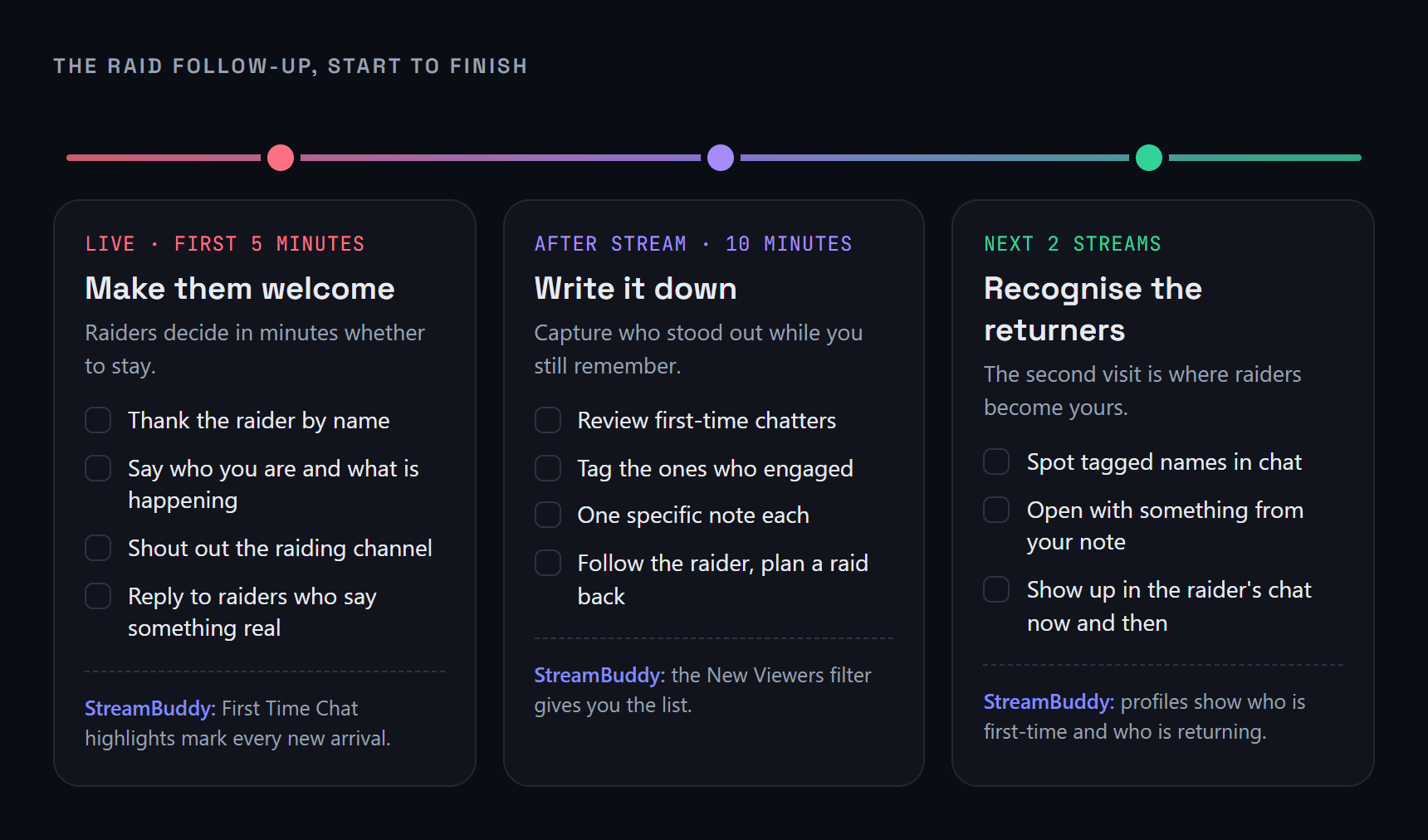
The whole raid follow-up on one page. Each stage is covered in detail below.
Why raids are so easy to waste
Raids arrive at the worst possible moment for remembering anyone. Chat suddenly fills with new names, emotes and greetings, often mid-game, and every one of those names is a stranger.
- Everyone blurs together. Twenty first-time chatters in a minute is impossible to track by eye.
- The interesting people get buried. The raider who asks a real question about the game scrolls past behind a wall of raid emotes.
- Nothing survives the stream. By the time you go offline, you remember that a raid happened and roughly how big it was — not who stuck around or what they said.
The fix is to split the work into what has to happen live and what can wait until after.
During the raid: the first five minutes
Thank the raider by name
Say the raiding streamer's name out loud, thank them, and mention what they were streaming if you know. Their viewers are watching to see how you treat their streamer. A warm, specific thank-you is the first thing that makes them comfortable staying.
Give the newcomers a reason to stay
Raiders land in the middle of something they know nothing about. Take thirty seconds to orient them:
- who you are, in one sentence
- what you are doing right now — the game, the goal, the challenge
- what happens next on stream
You do not need to restart the game or abandon what you were doing. The aim is to make the stream understandable, not to perform a welcome speech.
Shout out the raider
On Twitch, Affiliates and Partners can use the built-in /shoutout command, which shows a follow button for the raiding channel at the top of chat. You or your mods can run it, but it has a short cooldown and can only be used for the same streamer once an hour, so it is worth saving for the moment it lands best.
Reply to raiders who actually talk
Most raiders will drop an emote and leave. Watch for the ones who say something real — a question about the game, a joke, a comment about your setup. Those are the people most likely to stay, and a direct reply is the strongest signal you can send them.
Right after the stream: the ten-minute follow-up
This is where most raid value is lost — and where a short routine makes the biggest difference. While the stream is still fresh:
- Review who chatted for the first time. Raiders show up as first-time chatters, so this is your raid list.
- Tag the ones who engaged. Anyone who asked a question, stayed for more than a few messages, or felt like they clicked with the stream.
- Write one specific note about each. What game brought them in, what they asked, which joke landed. "Came from [raider]'s raid, asked about the controller settings" is enough.
- Note the raid itself. Who raided, roughly how many viewers, and what you were doing when they arrived.
- Return the favour. Follow the raiding streamer if you do not already, and consider raiding them back when it makes sense for your community.
The next two streams: recognising raiders who return
A raider coming back on their own is the moment they stop being someone else's viewer and start becoming yours. If they get treated like a stranger, there is little reason for them to come back a third time.
When someone chats whom you tagged after a raid, use your note: "you came in with the raid last week — did you end up trying that build?" That single line tells them they were noticed when they were one face among dozens.
If you want a broader routine for new viewers, not only raiders, turning first-time chatters into regulars walks through it step by step.
How StreamBuddy helps with raid follow-up
StreamBuddy is built for the remembering half of the problem. It does not change your alerts, bot or OBS setup — it sits alongside them.
- The raid is logged. The stream activity feed records each raid with the raiding channel and the number of viewers they brought, and the raider's own viewer profile counts their raid events.
- Raiders are flagged as new. The First Time Chat highlight marks each viewer's first message in your channel, so new arrivals stand out in the feed during the rush.
- Big raids do not scroll past. If chat speeds up enough to turn on Big Streamer Mode, raids appear on its Support card, with raids of 100 or more viewers highlighted.
- Notes and tags stay with the viewer. Click any name in chat to open their profile and save a note or a tag such as
raid— mid-stream or afterwards. - Your viewer list makes the review fast. The New Viewers filter shows everyone first seen in the last week, so your post-stream review starts from a ready-made list.
- Returning raiders are recognised. Profiles show whether someone is a first-time or returning viewer, and the Returning Viewer highlight flags anyone who comes back after a week or more away.
The raid follow-up page has more on how StreamBuddy fits into a raid workflow.
Raid follow-up mistakes to avoid
- Ending the stream right after a raid. If you are close to wrapping up, stay on for at least a few minutes. Raiders who arrive to an outro rarely come back.
- Turning the welcome into a lecture. A long explanation of your channel, schedule and Discord loses people faster than silence.
- Asking raiders to follow straight away. Earn it first. A good ten minutes does more than any request.
- Only thanking big raids. A raid of five viewers is a streamer choosing you. Treat it with the same warmth as a raid of five hundred.
- Forgetting the raider after the stream. The streamer who raided you is part of your community too. Show up in their chat now and then.
Frequently asked questions
What should I say when someone raids me?
Thank the raiding streamer by name, welcome their viewers, and spend thirty seconds explaining who you are and what you are doing right now. Then get back to the stream and reply to raiders who start a real conversation.
How do I know which viewers came from a raid?
Twitch announces the raid in chat with the raiding channel and viewer count, but it does not mark which chatters came with it. In practice, anyone chatting in your channel for the first time in the minutes after a raid arrived with it. StreamBuddy's First Time Chat highlight makes them easy to spot, and you can tag them for later.
Should I raid back the streamer who raided me?
It is a kind gesture and often the start of a good relationship between communities, but it is not an obligation. Raid back when it suits your community — a raid into a stream your viewers will enjoy is worth more than a raid on autopilot.
How many raiders usually stay?
It varies hugely with how well your content matches the raiding stream. Most raiders leave within a few minutes, which is expected. Focus on the few who chat — they are the ones you can actually turn into regulars.
Can I see past raids after the stream?
Yes. StreamBuddy records raids in your stream activity feed and in each raider's viewer profile, so you can see who raided you and when, and check whether their viewers have come back. Event details follow the retention period you choose in your privacy settings.
Turn raiders into regulars
StreamBuddy flags first-time chatters, logs every raid and keeps private notes on every viewer — so the raiders who stay are easy to recognise next stream.
Try StreamBuddy- twitch raids
- raid follow-up
- first-time chatters
- viewer retention
- community management