How to turn first-time chatters into regulars
A practical guide to welcoming first-time chatters, remembering what they told you, and following up so new viewers come back as regulars.
8 min read
Every regular in your chat was once a first-time chatter. Someone typed a message into a channel they had never spoken in, and something about the reply — or the lack of one — decided whether they came back.
Growth advice usually focuses on getting new people through the door: thumbnails, titles, schedules, clips. This guide is about the step after that, which is far cheaper and far more often neglected: turning the people who already spoke up into people who return.
Why the first message matters so much
Most viewers never chat at all. The ones who do have already crossed the hardest line — they have decided you are worth talking to. A first message is a small test: is anyone actually there?
What happens next sets the pattern. A viewer who is greeted by name and gets a real reply has a reason to come back. A viewer whose "hey, first time here" scrolls past unanswered has learned that chat in your channel is a one-way street. Neither of them will tell you which way it went.
Two things make this harder than it sounds:
- You cannot tell a first-timer from a regular by name alone. Usernames carry no history. The person who has watched every stream for six months looks exactly like someone who arrived thirty seconds ago.
- The second visit is where you usually lose them. Greeting someone once is easy. Recognising them a week later — and remembering what they told you — is the part human memory does not scale to.
Step 1: Notice first-time chatters while you are live
You cannot welcome someone you did not notice. When chat is calm you might catch every new name; on a busy night, a raid or a giveaway, you will not.
Twitch highlights a viewer's first message in your channel, which helps when you are watching Twitch chat directly. If you stream to several platforms, or read chat in a combined feed, you need the same signal everywhere.
In StreamBuddy, highlight cards mark notable viewer moments in the chat feed as they happen:
- First Time Chat — the viewer is chatting in your channel for the first time ever
- Returning Viewer — they are back after more than 7 days away
- Regular — they have sent 50+ messages in your channel
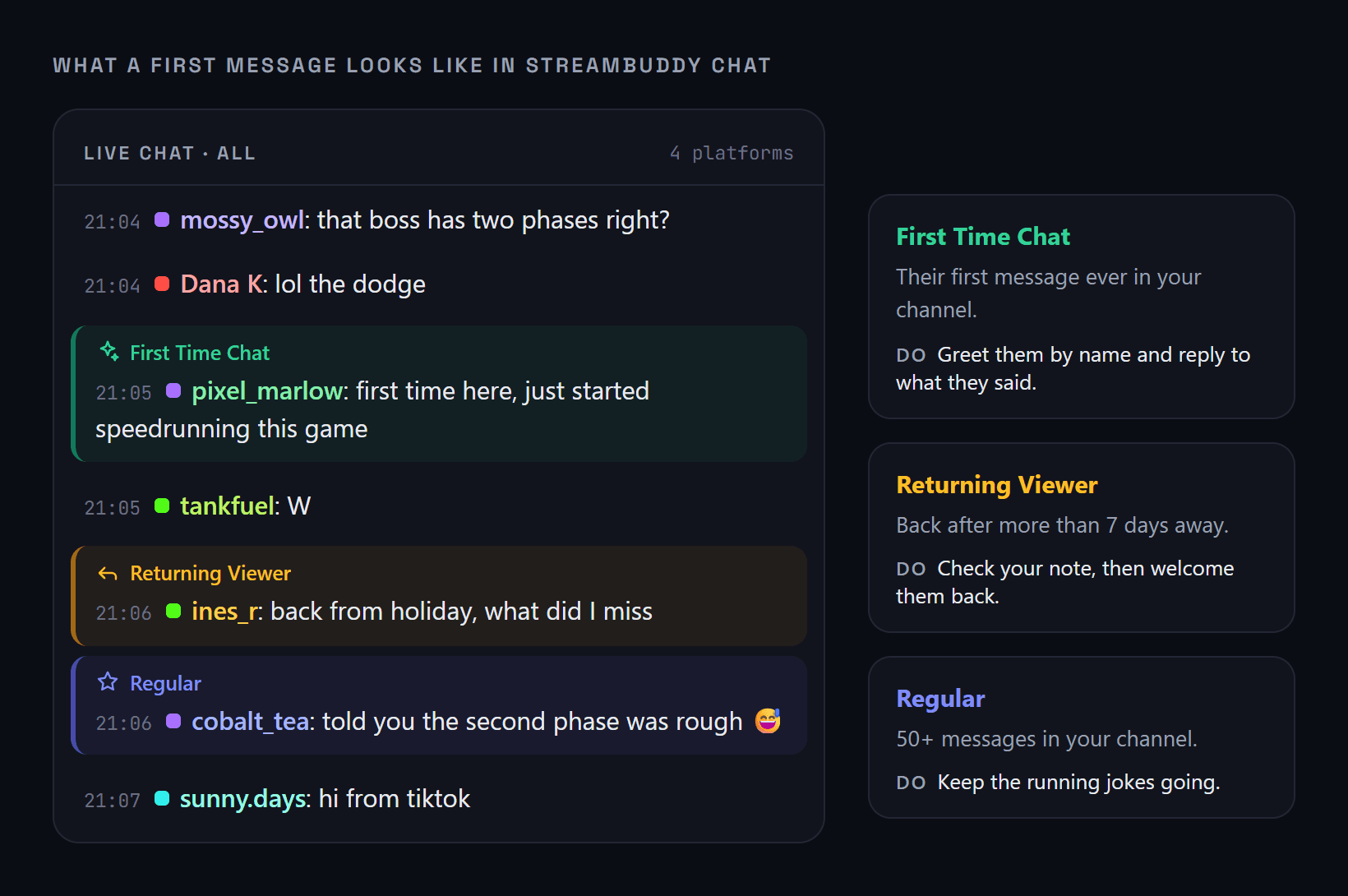
Highlight cards in the chat feed, with what each one is telling you. Illustrative chat; the card styles match the app.
You can switch each one on or off in chat settings → Chat Badges, and use the test button beside it to preview what it looks like before you go live.
Step 2: Welcome them like a person, not a bot
A welcome command that fires automatically for every new name is better than silence, but viewers can tell the difference. The welcome that builds a regular has three parts:
- Use their name. Say it out loud if you can, rather than only typing it.
- Respond to what they actually said. If their first message was about the game, the build or your setup, that is your opening — not a generic "thanks for stopping by".
- Give them an easy way to keep talking. Ask one small, low-pressure question: what they are playing at the moment, where they found the stream, whether they have tried this game.
Do not overdo it. A first-time chatter who gets thirty seconds of spotlight can feel singled out. One warm, specific reply is plenty.
Step 3: Write down one specific thing
This is the step most streamers skip, and it is the one that makes everything else work.
When someone tells you something about themselves — they are learning to draw, they are on night shifts, they just started this game, they are from the same city as you — save it. Not "seemed nice", but the specific detail you would want to mention next time.
In StreamBuddy, clicking a name in chat opens that viewer's profile, where you can add a note and tags. Notes stay attached to the viewer, so they are there the next time that person chats — three streams later, when you would otherwise have completely lost it. Tags work for grouping: new this month, art crowd, found me from a raid, or whatever helps you spot them again.
| What they said | A weak note | A useful note |
|---|---|---|
| "First time here, just got into speedrunning" | New viewer | New to speedrunning, asked how to start practising splits |
| "lol same, I work nights too" | Nice | Works night shifts, usually watches on the late stream |
| "is that a Moonlander keyboard?" | Asked about setup | Into split keyboards, building their own |
The useful note gives you something to open with next time. That is the entire point.
Step 4: Recognise them on the second visit
The second visit is where a first-time chatter becomes a returning viewer — or quietly drifts away. If they come back and get treated like a stranger, there is little reason to make it a habit.
When a returning viewer chats, glance at their profile before you reply. A line like "how's the speedrunning going?" or "did the night shift let you off early?" does more for retention than any alert or overlay, because it proves something viewers rarely get from a stream: that you remember them.
StreamBuddy helps here in a few ways:
- The Returning Viewer highlight flags people who are back after a week or more away.
- Each profile shows a relationship tier — First-time, Returning, Regular, Loyal or Core — earned from how many of your streams someone has chatted in. Tiers only move upward, so a regular who takes a month off is still recognised as a regular.
- Action badges suggest when a nudge is worth it: Welcome back for someone returning after an absence, Heating up for someone chatting more than usual, and At risk for an established regular who has gone quiet.
There is more on how StreamBuddy recognises regular viewers and how its viewer loyalty score ranks who is worth noticing right now.
Step 5: Review new chatters after the stream
While you are live, you will miss people. That is fine — the real work happens in the ten minutes after you go offline, while the stream is still fresh.
A simple routine:
- Open your viewer list and filter to New Viewers.
- Skim who chatted for the first time and what they talked about.
- Add a note to anyone who said something worth remembering.
- Tag the ones who felt like they might stick around.
The Regulars and Active Regulars filters are useful for the opposite check: who among your regulars did not show up, and whether anyone has been missing for a while. If you want to go deeper, remembering your regulars across platforms covers how notes, tags and history follow a viewer from stream to stream.
Raids bring in more first-time chatters at once than anything else, and they need their own plan — see what to do after a raid.
Mistakes that push new chatters away
- Ignoring the first message because chat is busy. If you cannot reply live, a mod can, and you can catch up after the stream.
- Making the welcome a spectacle. A sound alert and a long speech for every new chatter is overwhelming for quieter viewers.
- Asking for a follow in the same breath as the welcome. Let them enjoy the stream first. The follow comes from the experience, not the request.
- Mixing people up. Calling someone by the wrong name or attributing someone else's story to them is worse than not remembering at all. If you are not sure, check the profile.
- Only paying attention to supporters. Subs and donations deserve thanks, but the viewer who chats every stream without spending a penny is just as much part of your community.
Frequently asked questions
How do I know if someone is a first-time chatter?
Twitch highlights a viewer's first message in your channel. StreamBuddy adds a First Time Chat highlight in its own chat feed for every connected platform, alongside Returning Viewer and Regular highlights, so you can tell new viewers from familiar ones at a glance.
Should I use a bot to welcome new viewers?
A bot welcome is better than nothing, but it should not replace a personal reply. Use it as a safety net when you are busy, and follow up yourself with a reply to what the viewer actually said.
How many times does someone need to come back before they become a regular?
There is no fixed rule, but returning for a second and third stream is the big step. In StreamBuddy, a viewer moves from First-time to Returning once they have shown up in two of your streams, and to Regular after four, as long as they have been around in the last two weeks.
What should I write in a viewer note?
One specific, personal detail you would want to bring up next time: what they are working on, a game they love, a question they asked. Specific notes are useful for months; vague ones are useless within a week.
Can my viewers see the notes I write about them?
No. Notes, tags and profiles are private to you and your StreamBuddy workspace. They never appear on your stream overlay.
Remember every first message
StreamBuddy highlights first-time and returning chatters across your platforms and keeps private notes on every viewer, so the second visit feels like a welcome back.
Try StreamBuddy- first-time chatters
- viewer retention
- community management
- regulars
- twitch chat