A 10-minute post-stream review: what to check after you go offline
A simple 10-minute routine for after you go offline — read the recap, follow up on new chatters, check who was missing and find the moment that worked.
5 min read

When the stream ends, most streamers do one of two things: close everything and collapse, or open their platform dashboard and stare at the average viewer count. Neither tells you much about your community.
The most useful time to look back at a stream is the ten minutes right after it ends. You still remember who said what, which segment landed and who was unusually quiet. By tomorrow most of that is gone.
This guide is a simple routine for those ten minutes. It works with any setup, and it gets faster each time you do it.
Why review straight after the stream
Platform analytics are good at answering how many: viewers, follows, minutes watched. They are not built to answer the questions that decide whether your community grows:
- Who chatted for the first time, and what did they talk about?
- Which regulars showed up — and which ones did not?
- What made chat come alive?
- What should you remember for next time?
Those answers live in your chat, and in your own memory of the stream. Both fade quickly, which is why the review has to happen while they are fresh.
The 10-minute post-stream review
Minutes 0–2: Read the recap
Start with the numbers, but only the ones that point to people. StreamBuddy emails you a stream recap after each completed stream with unique chatters, new chatters, returning chatters, messages, peak active chatters, follows and subscriptions, plus a one-line comparison with your previous stream.
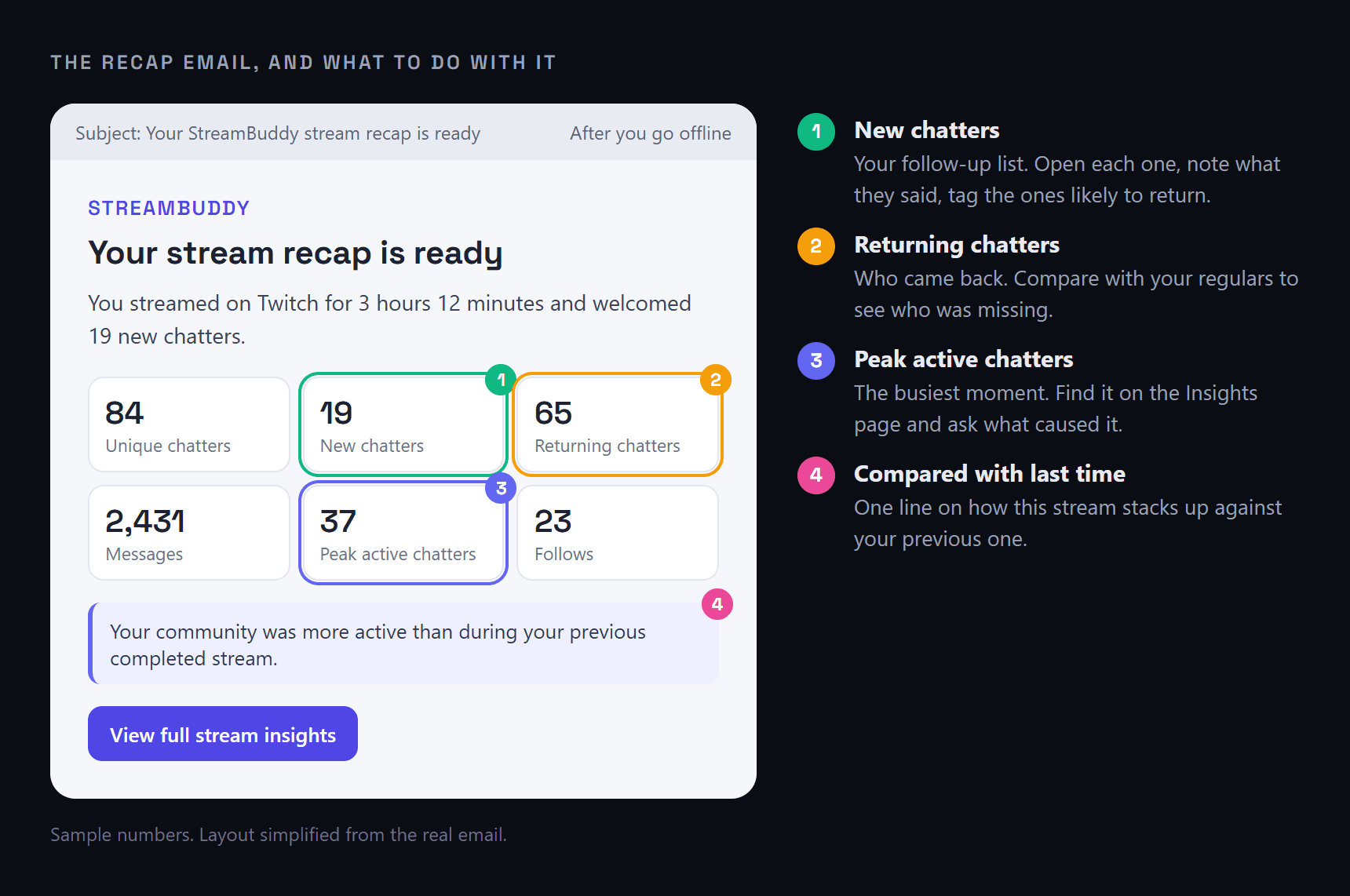
Every number in the recap points to a follow-up. Sample numbers.
Do not read too much into a single stream. You are looking for something to act on, not a verdict.
Minutes 2–5: Follow up on new chatters
This is the highest-value part of the review. Open your viewer list, filter to New Viewers, and go through who chatted for the first time:
- Open each profile and skim what they said.
- Add a short note with one specific detail — what they play, what they asked, what made them laugh.
- Tag the ones who felt like they might come back.
Three minutes of this makes the next welcome personal instead of generic. Turning first-time chatters into regulars goes deeper on what to write and how to use it next stream.
Minutes 5–7: Check who came back — and who did not
Switch the filter to Regulars. Who was there tonight? More importantly, who was not?
One missed stream means nothing. A regular who has been missing for three weeks is worth noticing. StreamBuddy flags these viewers with an At risk badge on their profile, and the Insights page lists them under At risk so you do not have to work it out yourself. A quick "missed you last week" next time they appear goes a long way.
Minutes 7–9: Find the moment that worked
Every stream has a moment when chat came alive. Find it while you still remember why.
On StreamBuddy's Insights page:
- Spikes worth replaying points to the moments when chat activity jumped — good candidates for clips, and good clues about what to do more of.
- What the room kept coming back to shows the themes chat talked about most.
- New vs returning shows whether tonight's chat was mostly familiar faces or new discovery.
Write down one thing that worked. That is often the start of next stream's plan.
Minutes 9–10: Write one line for next stream
Finish with a single note to your future self: a viewer to welcome back, a question you never answered, a bit chat loved, a segment to repeat. One line is enough. The routine only works if it stays short enough to do every time.
Look at trends once a week, not every night
Single streams are noisy: a raid, a holiday or a new game can swing every number. Once a week, set the Insights page to Last 30 days or Last 90 days and look for direction instead:
- Is the repeat attendance trend rising or falling?
- Are new faces turning into returning viewers, or leaving after one visit?
- Which kind of stream brings the most active chat?
That is where real decisions come from — schedule changes, which games to keep, which segments to drop.
Reviewing YouTube and TikTok streams
YouTube and TikTok work slightly differently in StreamBuddy. Their chat is kept for the stream itself rather than long-term, so after each stream you get an End-of-stream notes review: a short list of the viewers who stood out, with the reason they stood out and a box for your notes. Notes save automatically as you type.
When you are done, Finish review & wipe clears that stream's chat and AI summaries. Your saved notes stay on the viewers' profiles, so the people you wrote about are still recognisable next time.
Frequently asked questions
What should I look at after a stream?
Start with the people: new chatters to follow up on, regulars who came back or went missing, and the moment chat was most active. Raw totals like average viewers are useful for tracking growth over weeks, but they rarely tell you what to do next.
How long should a post-stream review take?
Ten minutes is plenty for most streams. The point is to capture what you remember while it is fresh — notes on new viewers, one thing that worked, and one thing to do next time.
Does StreamBuddy send a summary after every stream?
Yes. StreamBuddy can email you a stream recap after each completed stream with chatter, follow and subscription numbers and a comparison with your previous stream. You can switch it on or off in Settings → Notifications → Email stream summaries.
Does StreamBuddy replace Twitch or YouTube analytics?
No. Platform analytics are still the best source for things like watch time and average viewers. StreamBuddy focuses on the chat side: who took part, who returned, what the room talked about and who to follow up with. The post-stream analytics page has more detail.
What if I only have time for one thing?
Write notes on your new chatters. It is the step that most directly turns a one-time visitor into someone who comes back.
Make every stream count for the next one
StreamBuddy sends a recap after every stream, shows who was new and who came back, and keeps your notes on every viewer — so your next stream starts where this one left off.
Try StreamBuddy- post-stream review
- stream analytics
- viewer retention
- community management
- streaming routine