Chat engagement metrics for streamers
The chat engagement metrics worth tracking as a streamer, from active chatters and returning viewers to first-time chatters, platform mix and topics.
5 min read

Viewer count tells you how many people were around. Chat engagement tells you whether the room felt alive.
For streamers, the most useful metrics connect numbers back to people: who talked, who came back, which platform was active, what topics landed, and what should you remember before the next stream?
StreamBuddy helps with that people-first view. Connect supported accounts, go live with your current setup, read multichat in one private workspace, and review chat engagement with viewer profiles, notes, tags, activity context, and post-stream review.
Messages per minute
Messages per minute shows how fast chat moved during a stream or segment.
It is useful for spotting:
- Busy moments.
- Slow segments.
- Raid spikes.
- Q&A sections.
- Alerts or support events that changed chat pace.
Where it can mislead: one spam burst can look like engagement, and a quiet but focused stream can still be valuable.
Use it with chat history and topic review. The question is not only "did chat move?" It is "what made chat move?" On StreamBuddy's Insights page, Spikes worth replaying points to the moments when chat activity jumped.
Active chatters
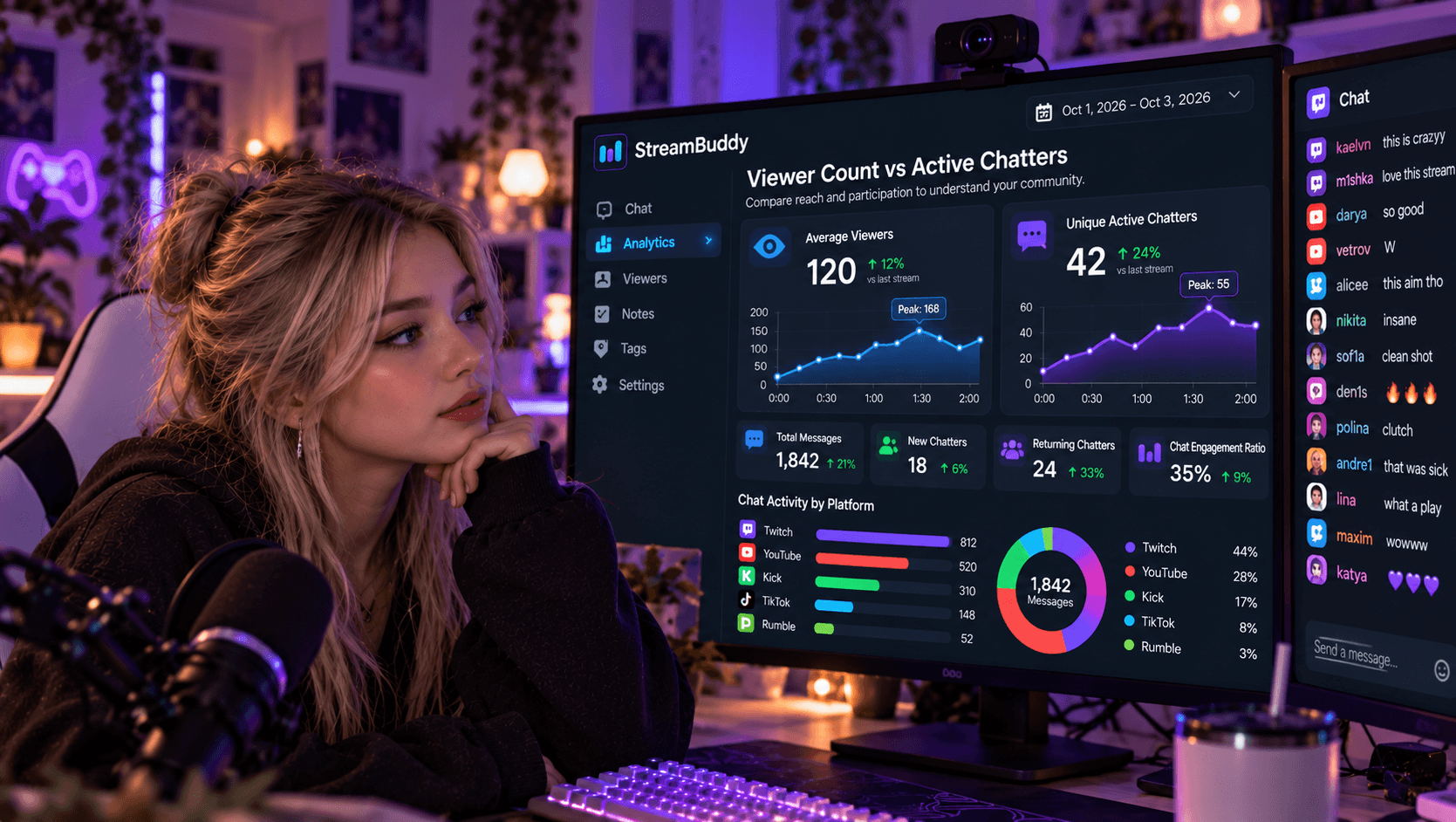
Active chatters are the viewers who sent at least one message.
This metric is useful because it separates passive reach from participation. A stream with fewer viewers but more active chatters may have a stronger community feel than a larger silent stream.
Pair active chatters with chat engagement ratio when you want to compare participation against audience size.
Look for:
- Unique chatters.
- Peak active chatters.
- Active chatters by platform.
- Active chatters during key segments.
Returning chatters
Returning chatters show whether people are coming back and participating again.
This is one of the clearest community health signals. A viewer who returns and chats again is moving from discovery into habit.
Use returning chatter metrics to ask:
- Who came back from last stream?
- Who returned after a break?
- Which first-time chatters became repeat participants?
- Which regulars have gone quiet?
- Which platforms are producing repeat chat activity?
StreamBuddy connects this to viewer retention analytics, private notes, tags, and viewer profiles so retention is not just a graph.
First-time chatters
First-time chatters are new people brave enough to type.
Track them because they are your most direct retention opportunity. A first message means the viewer crossed the hardest line. The follow-up decides whether they feel welcome enough to return.
Review:
- First-time chatters per stream.
- How many sent more than one message.
- What they talked about.
- Whether they came from a raid, collab, or platform discovery.
- Whether they returned later.
Add notes and tags only when they are useful. The goal is to make the second visit feel familiar, not to overload your workspace.
Platform mix
Platform mix matters when you stream to more than one place.
If Twitch, YouTube, Kick, TikTok, and Rumble are all active, average viewers alone may hide where the conversation actually happens. One platform may drive discovery while another drives loyal chat. One may be quiet during gameplay but active during Q&A.
Track:
- Messages by platform.
- Active chatters by platform.
- Returning chatters by platform.
- Which platforms react to which segments.
StreamBuddy keeps platform badges visible in the private multichat workflow so you can understand the conversation without opening every native chat separately. Its numbers are per platform too: the recap email for a multistream lists each platform, and the Insights page shows one of your channels, not a total across platforms. It does not follow one person from one platform to another.
Conversation topics
Conversation topics turn raw messages into content insight.
Review the questions, jokes, suggestions, debates, and recurring ideas that chat kept coming back to. These can help you decide:
- What segment to repeat.
- What clip to make.
- What question to answer next stream.
- Which game, product, or topic created real conversation.
- Which community moments deserve follow-up.
Use post-stream analytics to review these patterns while the stream is still fresh.
Supporter and activity context
Support events become more useful when connected to chat.
Depending on platform support, stream activity can include follows, subs, raids, gifts, Super Chats, and other events. A raw alert says something happened. Context tells you who it involved, what chat was doing around it, and whether it deserves follow-up.
Use the stream activity feed alongside chat review to connect activity back to viewers, topics, and moments.
Private metrics vs public overlays
Engagement metrics belong in your private workspace.
If you show chat on stream, keep the public overlay focused on display-safe chat output: messages, usernames, platform badges, emotes where available, and styling.
Viewer profiles, notes, tags, engagement metrics, retention context, and activity review should stay private unless you intentionally summarize them for yourself, moderators, or sponsor reporting.
A quick metric checklist
After each stream, check:
| Metric | What it answers |
|---|---|
| Messages per minute | When did chat move fastest? |
| Active chatters | Who participated? |
| Returning chatters | Who came back? |
| First-time chatters | Who is new and worth welcoming back? |
| Platform mix | Where did conversation happen? |
| Topics | What did the room care about? |
| Activity context | Which events deserve follow-up? |
Then write one action for next stream. Metrics are only useful if they change what you do.
FAQ
What chat engagement metric matters most?
For most streamers, active chatters and returning chatters matter more than raw message count because they show participation and retention.
Is messages per minute always good?
No. It can show excitement, but it can also show spam or one temporary spike. Use it alongside topics, active chatters, and returning-viewer context.
Can StreamBuddy track chat engagement across platforms?
Yes, platform by platform. The multichat feed, viewer profiles, notes, and tags cover every connected platform, and a multistream gets one recap email that lists each of them. The Insights page shows one of your channels.
Does StreamBuddy detect fake viewers?
No. StreamBuddy focuses on chat engagement and viewer context, not fake-viewer fraud detection.
Track the people behind the metrics
Metrics are useful when they help you understand people.
Connect your supported accounts in StreamBuddy, go live with your current setup, review active chatters, returning viewers, platform mix, topics, and stream activity, then use notes and tags to turn the numbers into community memory.
Measure chat like a community
Use StreamBuddy beside your current stream setup to track multichat engagement, returning viewers, notes, tags, and post-stream context.
Try StreamBuddy- chat engagement
- stream analytics
- active chatters
- viewer retention
- multichat